Fast, private, timestamped notes for every student, right on your device.
Record notes in seconds with predefined tags, organize by class, and generate clean reports. Works fully offline with on‑device storage. Light and dark modes, a home‑screen Quick Add button, and search & filter across tags make everyday capture effortless. Export or back up anytime.
Local & Private
All data is stored locally using Drift. No ads, no tracking, no cloud accounts. Your classroom data stays with you.
Lightning Note Capture
Use the Quick Add button right on the home screen, pick a tag (like “Great Day” or “Late”), and add an optional comment. Notes are auto‑timestamped.
Organize by Class
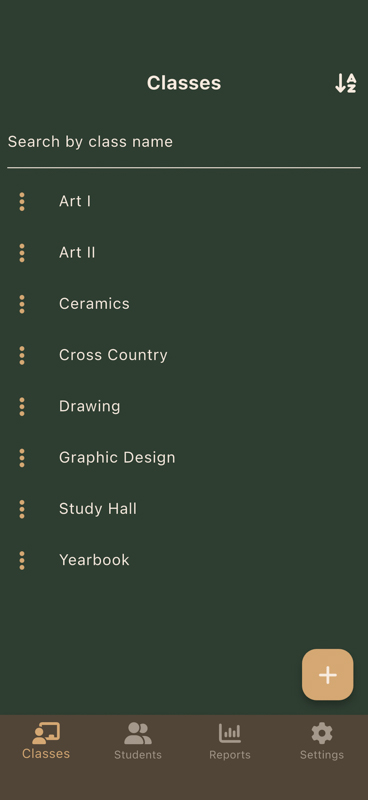
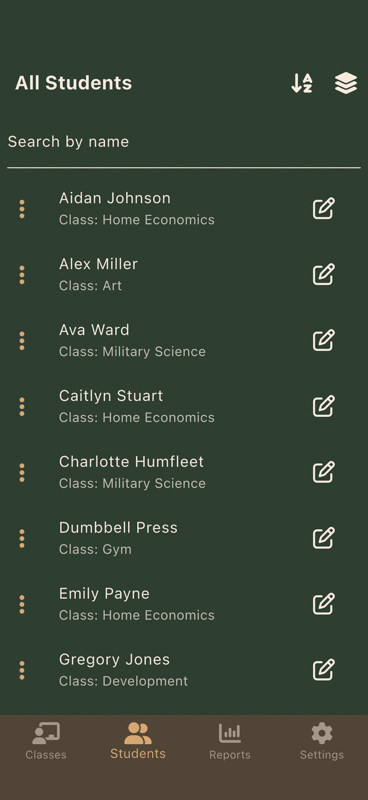
Create classes and manage students. A persistent nav bar on class and student screens keeps you moving. Filter timelines by class, tag, date range, or keyword.
Core Features
- Students with name, class/group, and identifiers
- Predefined tags plus your own custom tags — edit them on the fly
- Search and filter across tags from anywhere in the app
- Reverse‑chronological timelines with rich filters
- Light and Dark modes to match your classroom
- Home‑screen Quick Add for notes, students, classes, or tags
- Standard reports: Student Summary, Tag Frequency, Activity, Filtered Export, Class Overview
- Export to CSV/TXT and full JSON backup/restore
Free & Premium
- Free — no ads, no tracking, no accounts. Everything above is included.
- Premium — a one‑time upgrade that unlocks advanced reports, including the new Parent‑Conference Snapshot and Quiet Students Report.
- No subscriptions. Just your notes.